Remember everything you did
Daylens turns everything you do on your computer into a private, organized memory of your work, and gives you an agent that understands that memory.
Daily work is scattered across apps, websites, meetings, clients, and projects. You cannot reliably retrieve how much time went to a project, what you did at the end of a month, which meetings you had with a client, which page held the detail you saw last week, or simply where the day went.
Your own memory is usually the only thing connecting all of that. You reconstruct days from browser history, calendars, messages, and disconnected tools. AI does not fix it by default either. You explain the same context again, paste from several apps, or install another narrow product that remembers only one slice of the work.
Daylens creates the missing memory automatically.
It is more than a time tracker. Time is one part of the memory it builds. The larger goal is to make your work understandable and searchable on demand, for you and for the agents working with you.
The day, put back together
Daylens groups by what you were doing, not by which window happened to be focused. Writing in Cursor, checking a reference in the browser, and replying in Slack can still be one stretch of work. Idle time, lock screens, and system noise stay out of that story.
Your tools are evidence. Your work is the story. Daylens keeps the two connected without confusing one for the other.
Timeline
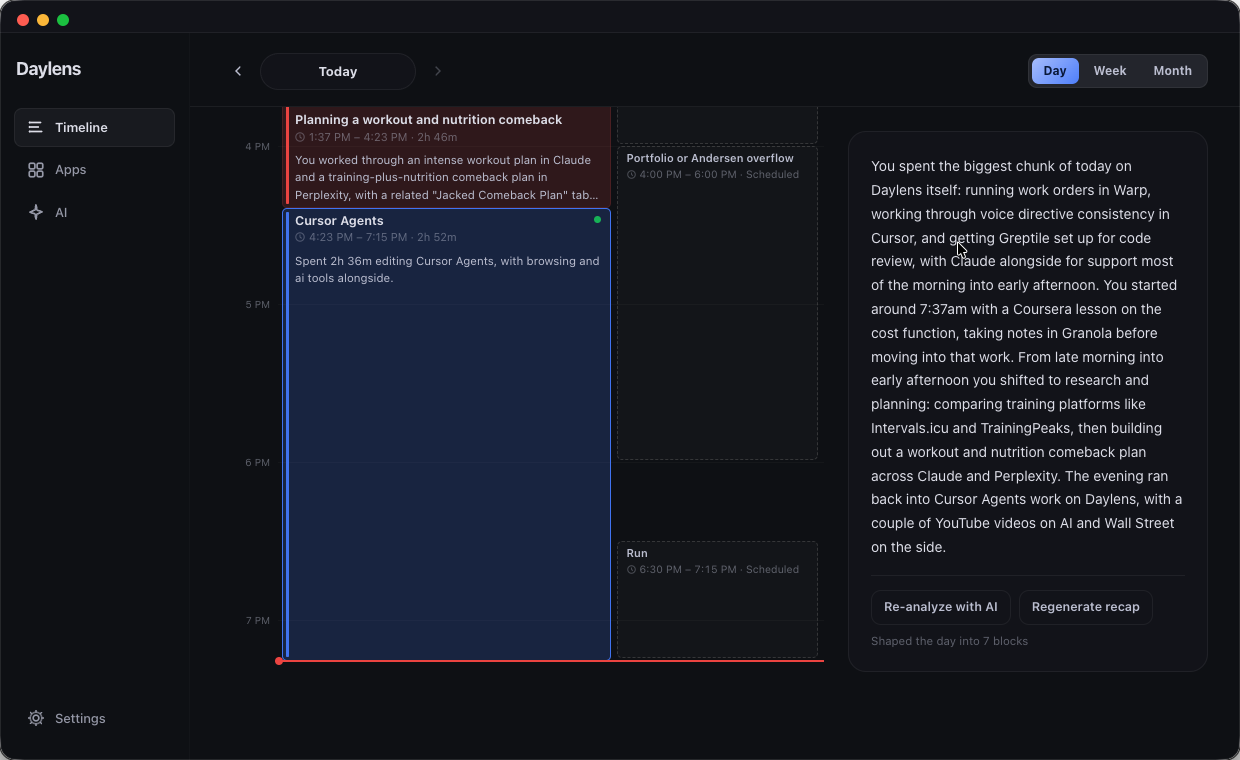
Timeline is the proof surface. It turns raw capture into a calendar-like account of what actually happened: applications, websites, meetings, files, projects, and clients in one chronology instead of separate histories.
Blocks are named for the work and sized by how long it took. Meetings, active work, and gaps read as different kinds of time. Each block can still be opened, understood, and corrected.
Apps and evidence
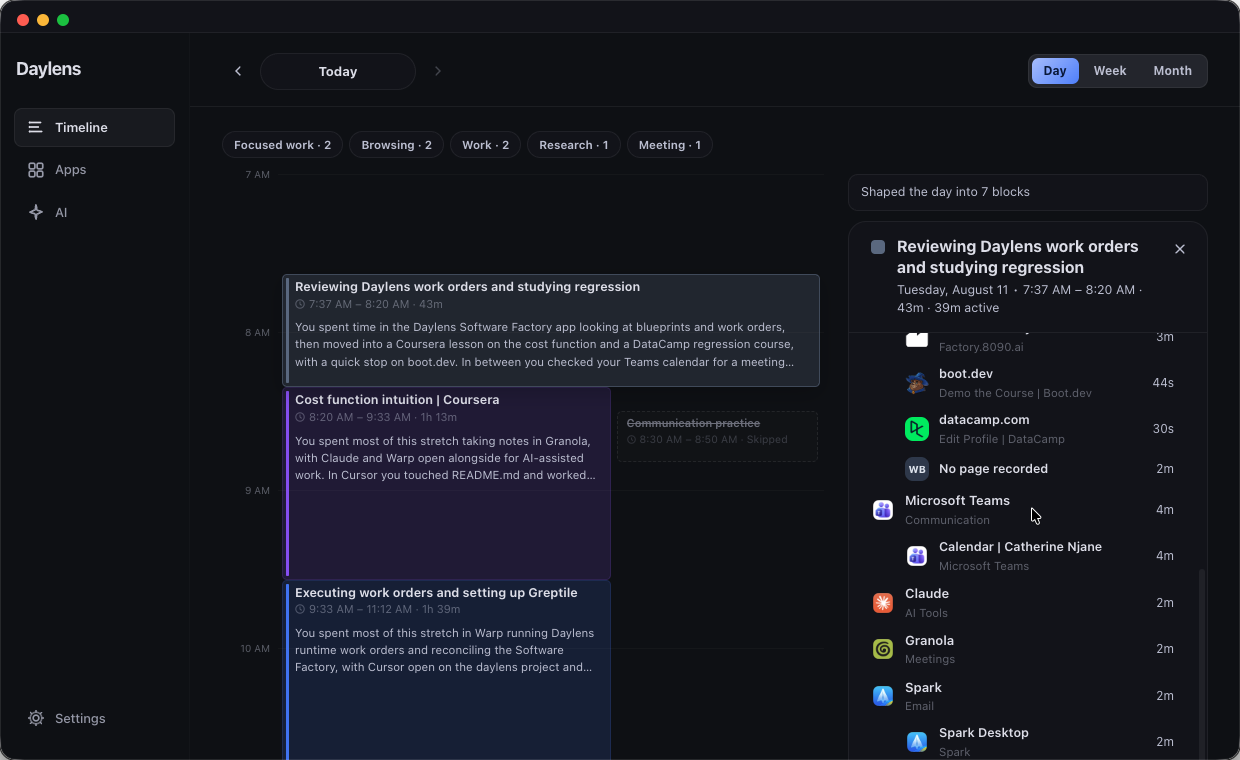
Apps is a second view of the same facts. It explains what you did inside each application, not merely how long the application was open. Open any app and you should see the pages, files, sites, and intentions that filled the time, plus when during the day it mattered most.
Timeline and Apps must agree. Their totals and explanations come from one memory.
Ask in Daylens
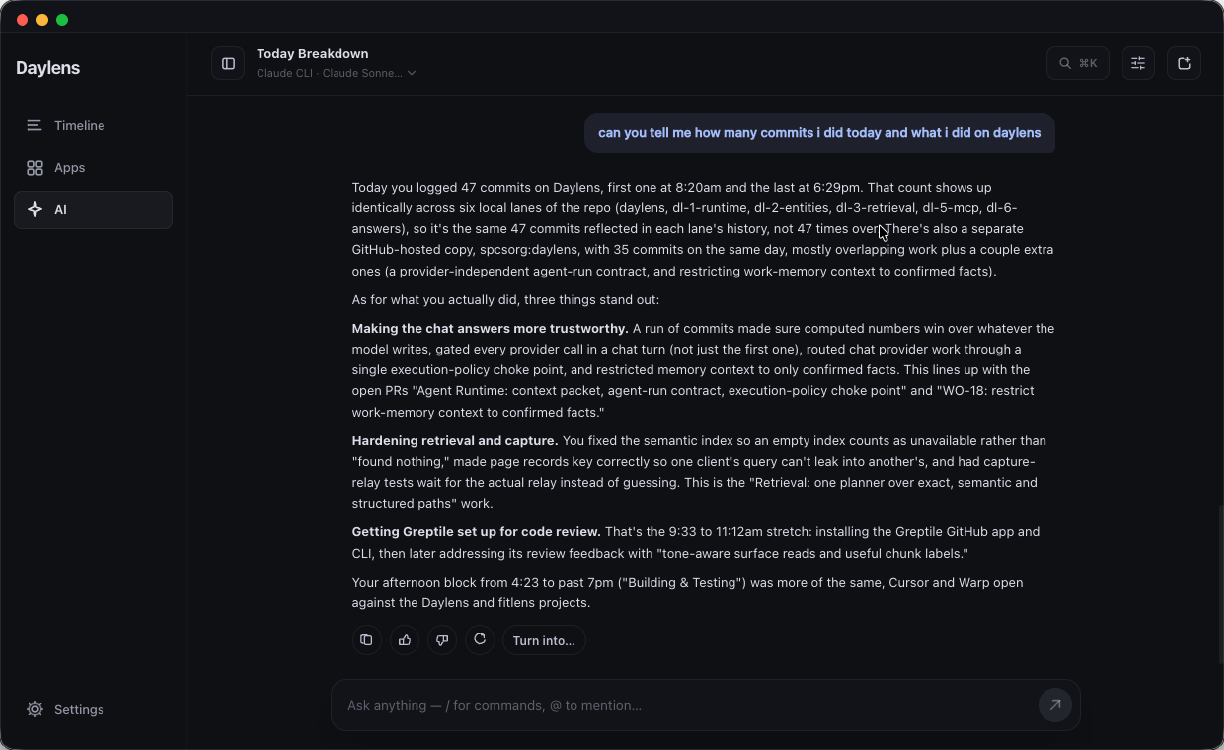
The AI agent is the conversational interface to that memory. Ask what you got done, where an afternoon went, what you worked on for a client, what you read before a meeting, or draft a weekly update from the week itself.
It should feel like Daylens already understands the work. You should not have to list every application involved or paste the same background into a new conversation. “You spent two hours in Chrome” is not enough when Daylens can explain which project, meeting, page, or client that time belonged to.
Answers stay grounded in evidence you can still open. Threads, follow-ups, tables, charts, and artifacts live here too. Reports and exports belong in the same surface: ask for a client summary or an evidence-backed export, and Daylens generates it from tracked facts rather than from a separate reporting product.
You can also bring that context into the AI tools you already use. Opt in to share Daylens memory with Claude, Cursor, and similar agents through MCP or handoff when you want your day as context there. Off until you turn it on.
One memory across every surface
Timeline, Apps, AI, search, MCP, sync, Wrapped, and briefs all read the same corrected facts. A rename, merge, exclusion, or attribution change made once survives rebuilds and updates every relevant surface.
Daylens should sound like a person who understands what happened, not like a system reading telemetry back to you. When the evidence supports it, it names the subject, project, client, people, and outcome. When the record is incomplete, it says so in one natural sentence instead of inventing confidence.
It is not a productivity score. It does not diagnose distraction, grade the day, or dress thin evidence up as a win.
Wraps, briefs, and focus
Wrapped turns a day, week, month, or year into a story built from the same facts as Timeline and Apps: what the period was about, honest totals, notable specifics the evidence supports, and clear gaps Daylens cannot explain.
Briefs deliver that understanding at useful moments: an evening recap, a morning look back at yesterday, and a weekly brief at the week boundary. They are proactive delivery of the same memory, not a second summarization system.
Focus sessions are user-initiated. You declare a session, optionally label and reflect on it, and review it against what the tracker actually saw. They are work context, not an automated focus score.
Capture and privacy
Daylens captures quietly in the background using app, window, and browser metadata. Private and incognito windows are never captured. Exclusions and pauses are enforced before evidence is saved or sent downstream.
Activity lives in a local database on your laptop. That database is the source of truth. What leaves the device is what you choose to send to a model when you ask, or what you enable for optional sync. No keylogging. Screen context is an opt-in experiment, not the default product.
Core capture, Timeline, Apps, corrections, search, and privacy controls stay useful without a model provider. Managed AI is paid because it uses paid APIs. Bring-your-own-key remains available so provider cost never decides whether you can ask your own memory a question.
Optional workspace and web access are additive. The desktop app remains the source of truth for capture, persistence, and reconstruction.
From activity to memory
- Capture quietly — foreground apps, window titles, browser pages, idle and lock state.
- Build the day — related activity becomes blocks based on what you were trying to do.
- Remember clearly — read Timeline, open Apps, ask AI, or hand that context to the tools you already use.
Platforms
One cross-platform desktop product for macOS, Windows, and Linux, with an optional web companion for remote recall when you want it.
Tech stack
- Desktop: Electron, React, TypeScript, local SQLite
- Capture: Platform helpers on macOS (Swift) and Windows (C#)
- Memory and AI: Grounded answers over local facts, local MCP server, connectors such as GitHub and Linear
- Web companion: Next.js, Convex
Why I built this
I kept finishing work days unable to reconstruct where the time went, and I kept explaining the same context to AI tools before they could help. Screen Time showed apps. Manual timers asked me to babysit the clock. Narrow memory products remembered meetings or notes, not the whole laptop day.
Daylens is the private memory layer for everything that happened on this computer: searchable on demand, correctable when it gets something wrong, useful without AI, and honest about what it does not know.