you have no idea where your time goes
every developer i know has had this moment. you close your laptop at the end of the day, you know you were busy, you have the fatigue to prove it — but if someone asked you to account for the last 8 hours in any real detail, you couldn't. not because you didn't work. because the specifics just evaporate.
i went looking for whether this was just me. it's not. in 2022, a Harvard Business Review study tracked 137 workers across three Fortune 500 companies and found the average person switches between apps and websites over 1,200 times a day. one switch every 24 seconds in an 8-hour workday. i read that and thought it had to be wrong. then i started paying attention to myself.
so i went looking for a tool that could actually show me what my day looked like. not roughly — precisely. not which apps were open. what i was actually doing.
what i tried
i tried Pomodoro. doesn't work for me. 25 minutes, 5 minutes, four rounds, and i'm like what the hell am i doing? i can do better than a kitchen timer. then there's Forest — "you can't kill this tree!" — yes i can. i have tabs to check. these blockers are built on willpower, and willpower isn't actually the problem. the problem is i have no idea what happened to my time after the day is over.
so i went deeper and tried the trackers.
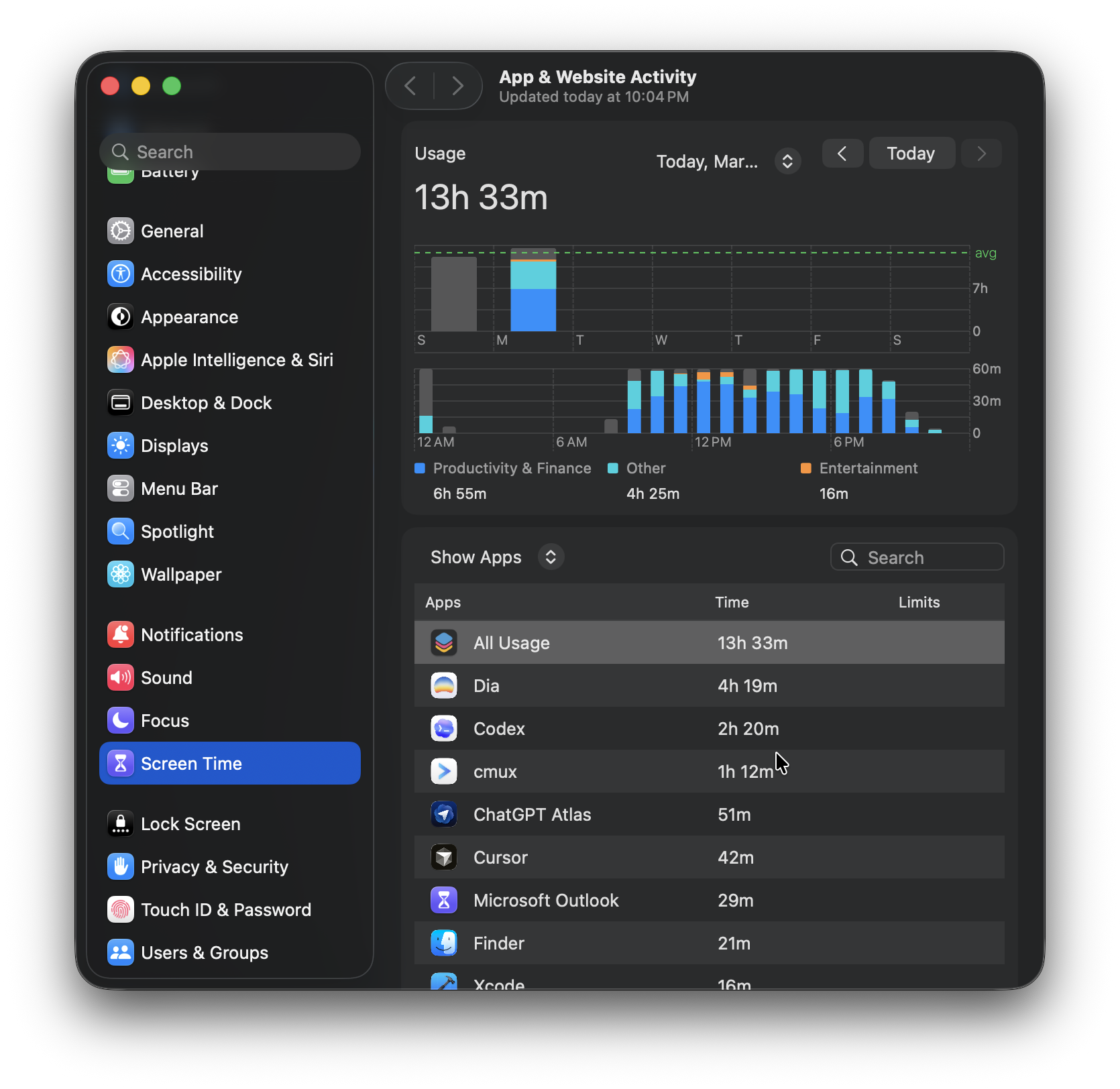
Screen Time is the obvious first stop. already there, free, no setup. but here's what you get: app names and total durations. "Dia: 4 hours 19 minutes." okay Apple, let me ask you something — why was i in Dia for 4 hours? it's like going to the doctor and they tell you "you have a problem somewhere in your body, i just can't tell where." cool, thank you, very helpful. Screen Time counts containers. not what's inside them.
RescueTime tries harder. been around since 2008, runs in the background, categorizes your apps into productive vs. distracting, and generates a daily score. there's a reason it still has users. but the categories are global and blunt. YouTube is "distracting" by default, even if you're watching a conference talk relevant to what you're building. VS Code is "productive" even when you've been staring at the same function for 45 minutes, completely stuck. and everything goes to their servers. it's productivity theater with categorical logic: VS Code = good, Chrome = bad. you'd have to manually recategorize everything yourself, at which point what is the app even doing?
Rize is more recent, uses AI to categorize sessions automatically, and has a cleaner interface. it genuinely tries harder. but in practice the auto-categorization is wrong about 30% of the time. it's $15/month, and if you stop paying, your historical data is deleted. that last part bothered me more than anything else.
StayFree has 30 million users and is well-designed, but it's a blocker. it's built to help you spend less time on your phone. their browser extension is solid and syncing works well, but something's just off. the data stays vague and without going deep you're stuck staring at the screen asking the same questions you started with.
none of them could tell me what i was actually doing between 2pm and 4pm on a given day. they all answered a different, easier question.
let me show you daylens
Daylens watches your apps and browser activity natively and builds your day as a timeline of labeled work blocks. no extensions, no screenshots, nothing leaves your machine.
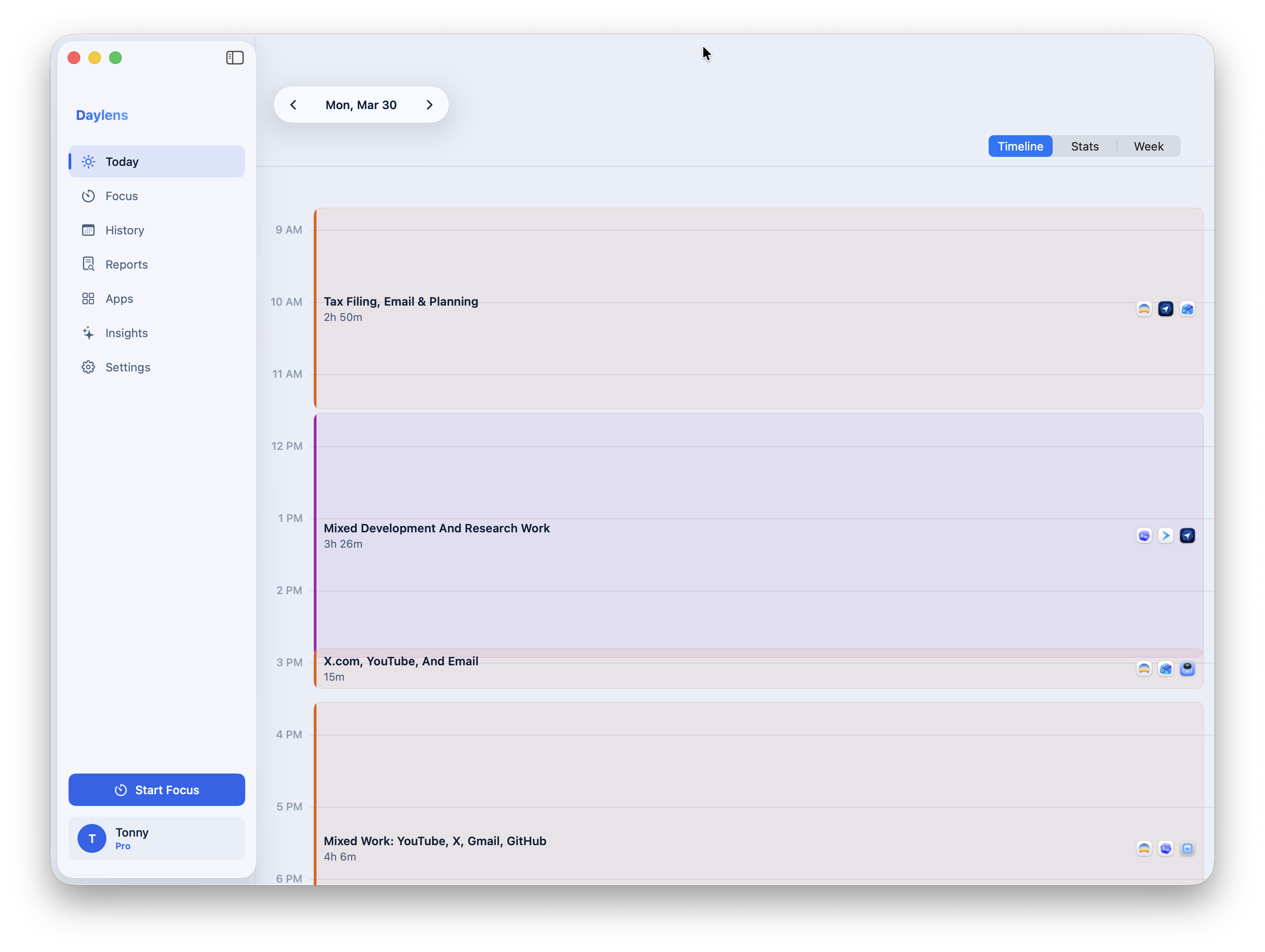
that's a real day of mine. not too productive, but hey — don't judge. four sessions. not "apps that were open" but what i was actually doing and for how long. you can navigate to any day and see this same breakdown.
click on any block and you get the full picture.
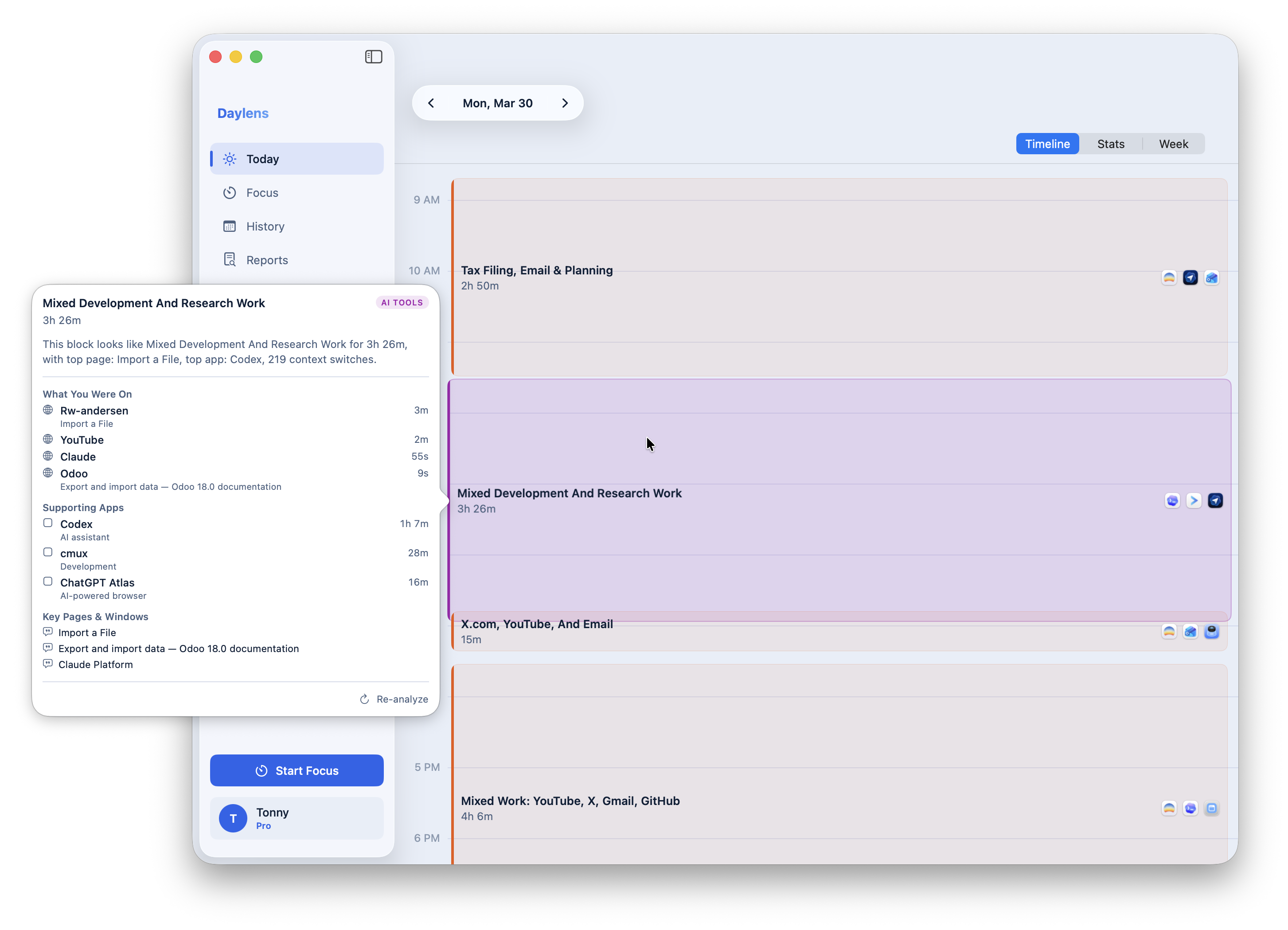
that "Mixed Development And Research Work" block isn't just a label i created. Daylens analyzed the session and understood what was happening: Codex as the primary tool for 1 hour 7 minutes, cmux for development work, Claude and Odoo pages open in the background. 219 context switches detected in that one session. the analysis runs on every block automatically, not sitting in a separate feature you have to go find and turn on.
the stats view shows the day in numbers. sort of what Screen Time should've been.
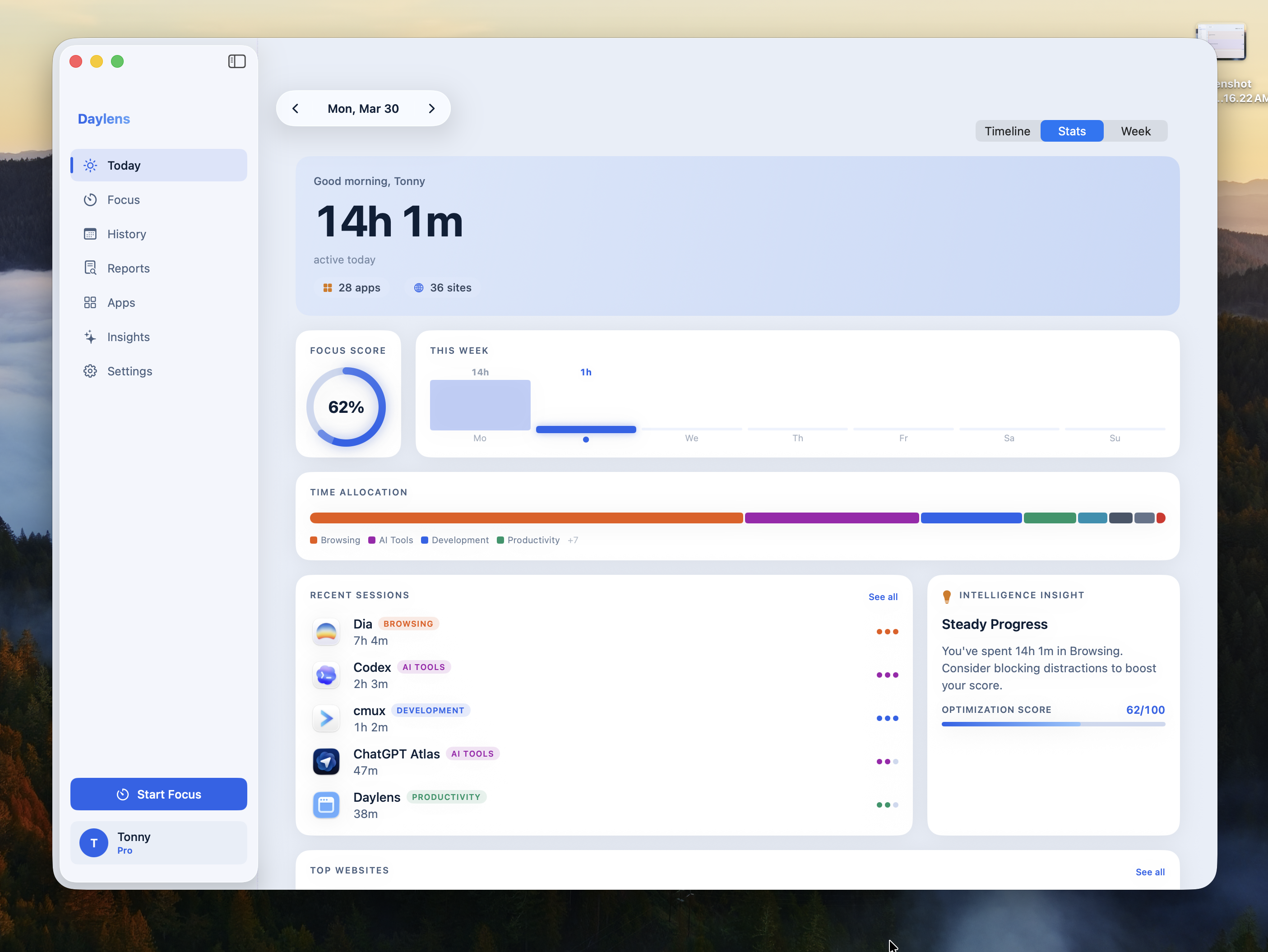
the focus score is based on your own switching behavior relative to your own history, not some external benchmark. the intelligence insight reads your actual data and surfaces what's worth knowing. it's not a generic tip generator.
everything stays on your machine. no account needed, nothing leaves your device unless you choose to enable the web companion. the whole thing is open source, so you can read exactly what it does.
one more thing
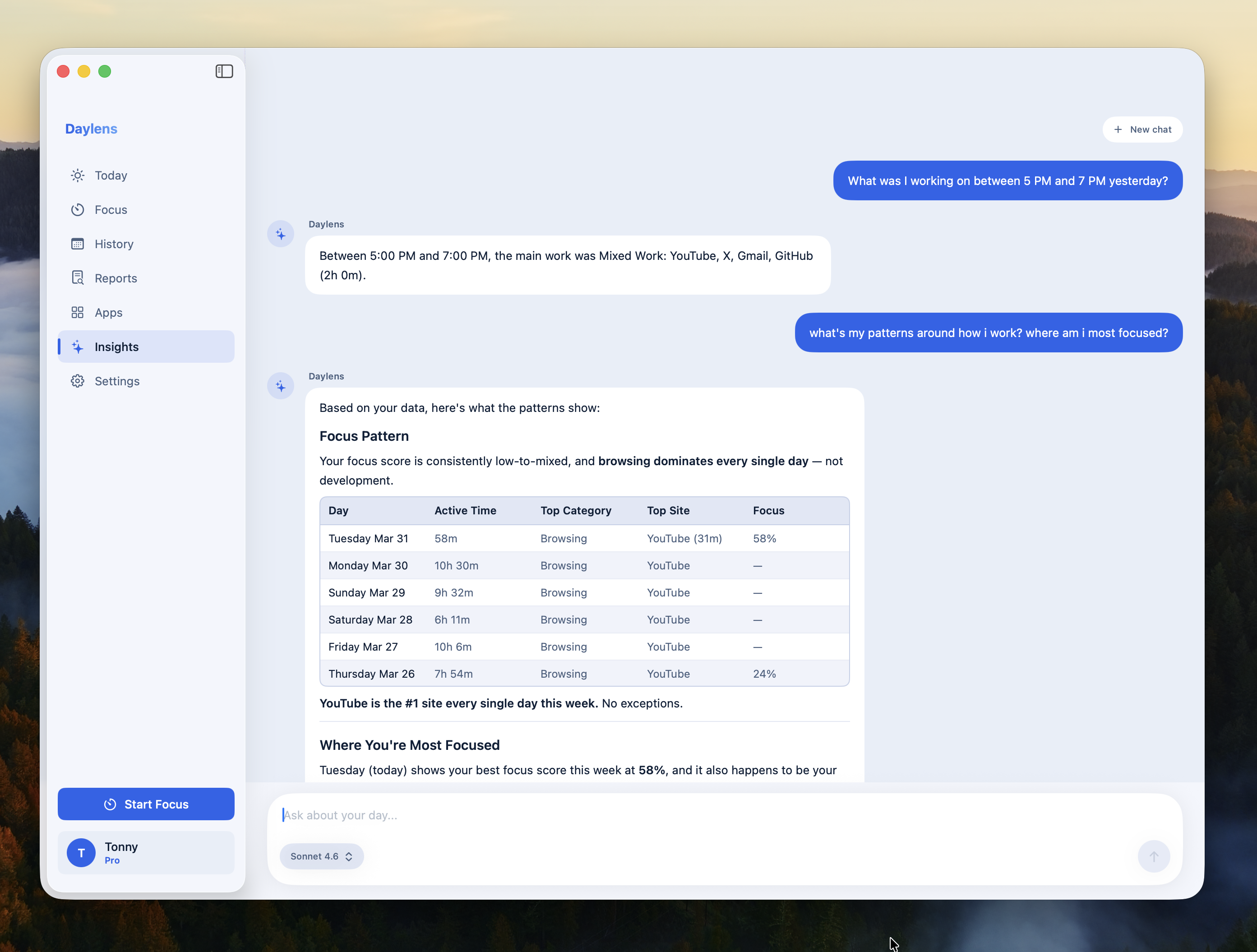
once your days are tracked, you can ask questions across all of it. that's the Insights tab.
but here's the thing i'm actually building toward. and i want to address something directly first, because the obvious pushback is: ChatGPT has memory. Claude has Projects. there are connectors to Gmail, Google Drive, calendars. so what's actually different here?
here's what those tools know: what you've told them.
ChatGPT's memory saves facts it picks up from your conversations — your job, your preferences, things you mention in passing. Claude Projects stores files you manually upload and keeps them available across sessions. the connectors to your calendar and email can fetch data, but only when you ask. none of these tools are passively watching what you're doing. they have no window into your screen, your apps, or how your actual day unfolded. every conversation still starts with the same implicit question — what are you working on right now? — and you're the one who has to answer it.
Cursor and GitHub Copilot do something more passive: they index your codebase automatically when you open a project. but they only see your code. they don't know you spent two hours reading documentation before touching a file. they don't know your focus dropped after lunch. they don't know you switched contexts 219 times in one session. they see one slice of your day.
what none of these tools have is a record of your actual day — across all your apps, all your browser tabs, organized into what you were doing and for how long. that's the gap. and that's what Daylens captures.
the direction i'm building toward: an assistant that already has the picture before you open your mouth. not because you told it. because it was there. you don't explain your context. you don't catch it up. you just ask.
the tracking is step one. the insights are step two. what comes after, the kind of help that starts informed, is what i'm working toward.
free, open source, and i'd love feedback from anyone who's been thinking about this.
CT